App tour
Explore the app
Your Music Life. One App.
These are real GORRA screens. Follow the numbers on each screen to see what you can do.
Start the tour01 / 06 Practice / Practice
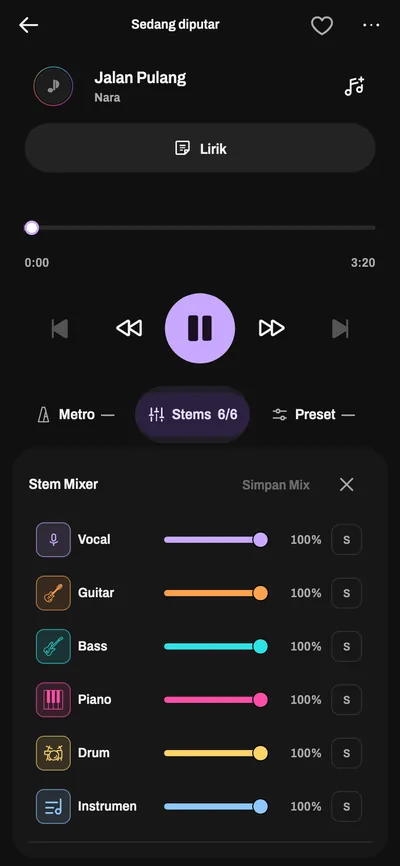
Mute the vocals. Set the tempo. Learn the song.
Discover songs and save them to playlists. Open available lyrics and chords, then work on your part with Stem Mixer, pitch and tempo controls, and the metronome.
- Open available lyrics and chords while the song plays.
- Tap Stems to open the Stem Mixer, next to the metronome and presets.
- Slide each part, like the vocal down to 0%, then play or sing your part.
02 / 06 Create / Make music
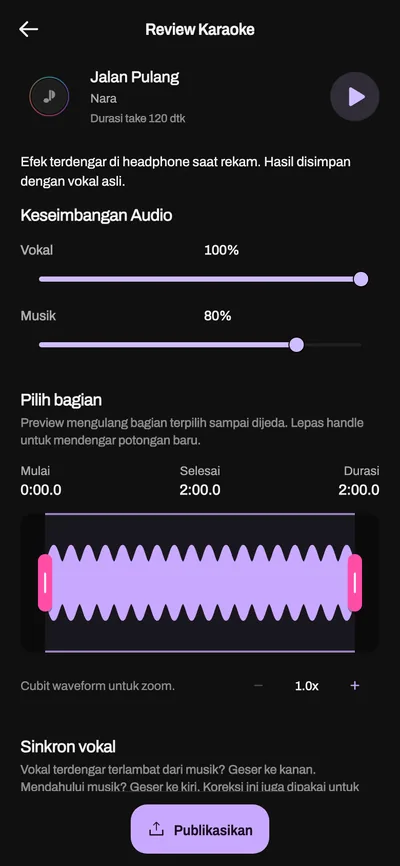
Feeling good? Record it. Share your take.
Sing with a backing track and record audio or video. Adjust the volume, choose the part you want to share, or post your own videos and photos.
- Balance your vocal against the backing track.
- Drag the handles to pick the part you want to share.
- Publish your recording.
Native Perform
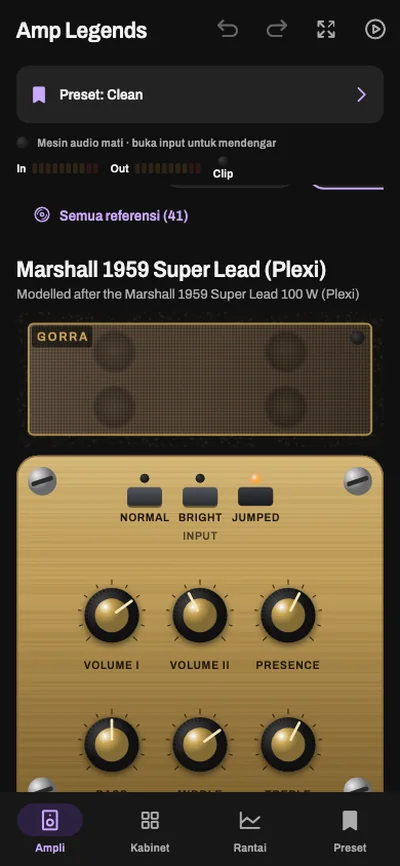
Your space to play and record instruments inside GORRA. Start without a song, use a backing track, or play the part of an instrument you have muted.
- Pick a tone preset for your guitar.
- Turn the amp knobs as you would on stage.
- Switch amp, cabinet, effects chain, or preset from the bottom bar.
- Choose Loops, Pad, or Mixer.
- Set the tempo, or use Tap Tempo.
- Add a fill, crash, variation, or break while you play.
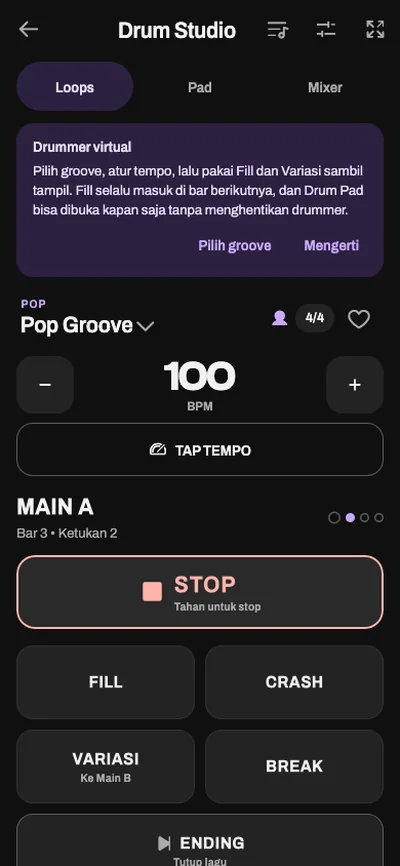
Example Amp Legends and Drum Studio screens in Native Perform.
Sounds ready to play.
Pick a preset and play. You can reshape any preset with Customize.
Vocals8 vocal presets, 3 of them pitch correction.
- Natural
- Your voice as it is, with only low rumble cleaned up.
- Studio
- Tighter compression and a touch of room, like a studio take.
- Warm
- Fuller low-mids with softened treble.
- Bright
- Clearer presence that cuts through the music.
- Arena
- A big room and echo, like a concert stage.
- Soft Tune
- Gentle pitch correction that keeps your vibrato.
- Modern Tune
- Tight, clearly corrected pitch, as in today's pop.
- Hard Tune
- The stepped, robotic tuning effect.
Vocal harmony adds up to 2 voices. Pitch correction and harmony follow the song key.
Guitar8 guitar presets and 9 Amp Legends amps.
- Clean
- Dry and untouched, level only.
- Warm
- Bluesy warm clean with slapback and spring reverb.
- Jazz
- Clean and mid-focused, with the treble pulled back.
- Crunch
- Light drive with forward mids for rhythm.
- Rock
- Thicker drive and strong mids for riffs.
- Lead
- Heavy drive, sustain, and delay for solos.
- Metal
- Tight lows, scooped mids, and a hard gate for palm mutes.
- Ambient
- Repeating delay into a long reverb for atmosphere.
Amp Legends: 2 clean, 3 crunch, 3 high-gain, and 1 solid-state amp, with cabinets and an effects chain.
Bass5 bass presets, 3 amps, and 16 starter tones.
- Clean
- A transparent DI with gentle compression and flat EQ.
- Warm
- Full low-mids and light tube drive, vintage style.
- Punch
- Every pluck comes through, with a broad mid scoop.
- Drive
- The low note stays clean while its harmonics growl.
- Deep
- Deep lows for dub and flatwound, treble rolled off.
Bass Amp Legends starter tones by genre:
- Vintage / Soul
- Round Sixties Soul, Soul Thump
- Rock
- Stadium Rock Stack, Cranked Flip-Top
- Funk / Slap
- Slap Sparkle, Funk Fingers
- Modern Metal
- Modern Metal Grind, Tight Clank
- Jazz / Fusion
- Fusion Clean, Warm Jazz Room
- Reggae / Dub
- Ultra Low Dub, Deep Dub Flip
- Pop / Punk
- Pick Grind, Punk Drive
- DI Studio
- Studio DI, Flip-Top + DI
Synth102 synth sounds and 68 accompaniment styles.
- Bass · 27
- Deep Sub Bass, Acid Line Bass, Detuned Reese Bass
- Keys · 20
- Electric Tine Keys, Warm Organ Keys, Music Box Keys
- Lead · 15
- Classic Analog Lead, Glide Mono Lead, Seruling Breath Lead
- Pad · 14
- Warm Poly Pad, Choir Air Pad, Embun Pagi Pad
- Pluck · 12
- Crystal Pluck, Kecapi Pluck, Rain Drop Pluck
- Arp · 8
- Bubble Arp, Neon Arp, Gentle Harp Arp
- Texture · 6
- Ocean Noise Wash, Hujan Rintik Texture, Drone Field
Accompaniment styles, from dangdut to electronic:
- Dangdut & koplo · 8
- Dangdut Klasik, Koplo Jawa Timur, Congdut
- Nusantara · 5
- Keroncong, Jaipong Pop Sunda, Qasidah Gambus
- Electronic · 10
- Synthwave, Techno, Liquid Drum & Bass
- Soul & R&B · 9
- Classic Soul, Neo Soul, 90s R&B
- Hip-hop · 7
- Boom Bap, Lo-fi Hip-Hop, Drill
- Dance · 5
- Disco, House, Funkot
- Pop · 4
- Pop 8 Beat, City Pop, K-Pop Dance
- Latin · 5
- Bossa Nova, Samba, Reggaeton
- More · 15
- Rock, ballad, jazz, reggae, Afrobeats, and Amapiano
03 / 06 Connect / Find your people
Need someone to play with? Find them here.
Explore artists or search by name and username. Listen to their songs, browse releases and work on their profiles, then follow, message, or invite them to collaborate.
- See the artist's profile, city, and verification.
- Follow, message, or send a gift.
- Listen to highlights and songs.
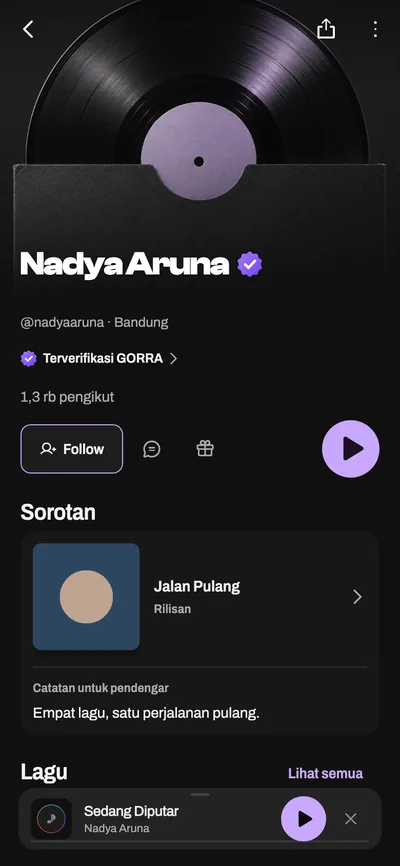
Example profile and work. Names and figures on screen are illustrative.
04 / 06 Perform / Find a stage
Ready to play? Find your next gig.
Browse gigs, regular slots, and events that suit you. Check the requirements, schedule, location, and fee before applying.
- Search for jobs or roles.
- Filter by location and role.
- Compare dates, fees, and locations before applying.
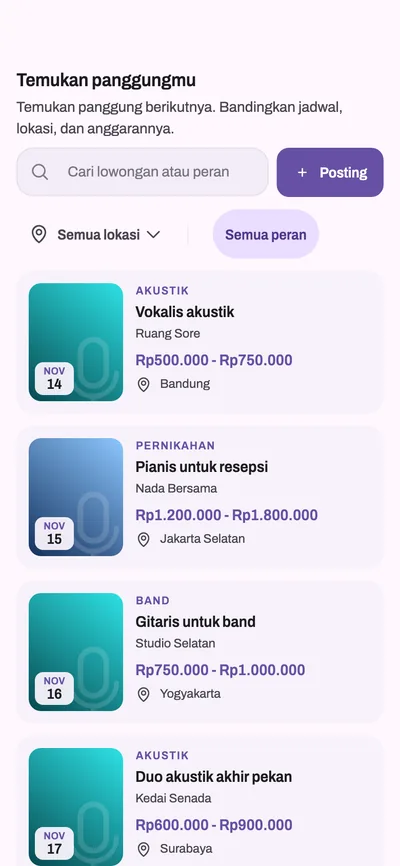
Example gigs. Check availability and offer details in the GORRA app.
Play music. Go live. Say hello to your audience.
Stream your performance and connect with viewers through comments, love, and gifts. Check your remaining airtime in the app, with a daily allowance and extra minutes available.
- Add a title for your stream.
- Choose effects before you start.
- Tap Start Live.
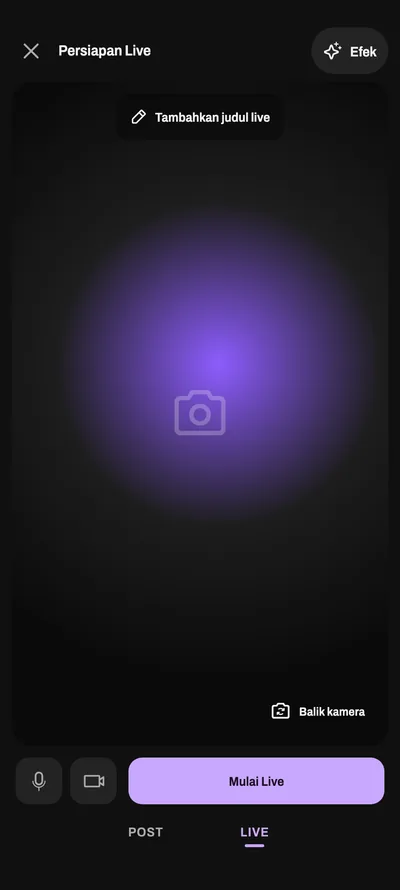
05 / 06 Earn / Get paid
Support for your music.
Receive gifts on videos, live streams, profiles, or songs. Offer subscriber-only content through creator subscriptions and manage ticket sales when your account meets the requirements.
- Your coin balance and top-up sit at the top.
- Pick a gift; each shows its price in coins.
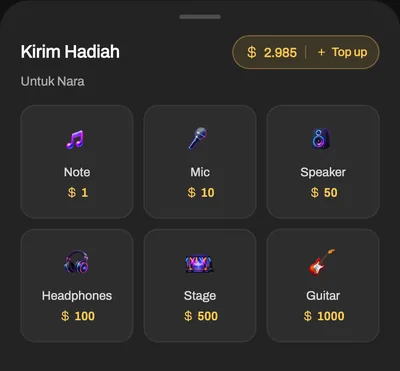
Coins are for gifts and subscriptions. Credits are for music processing. Earnings have a separate balance in your wallet.
06 / 06 Grow / Music Passport
Share your GORRA.
Bring releases, playlists, featured work, and music experience together on your profile. Share an overview through Music Passport.
- Your profile, roles, city, and genres on one card.
- Others scan the QR code to open your passport.
- Followers, performances, and collaborations sit below.
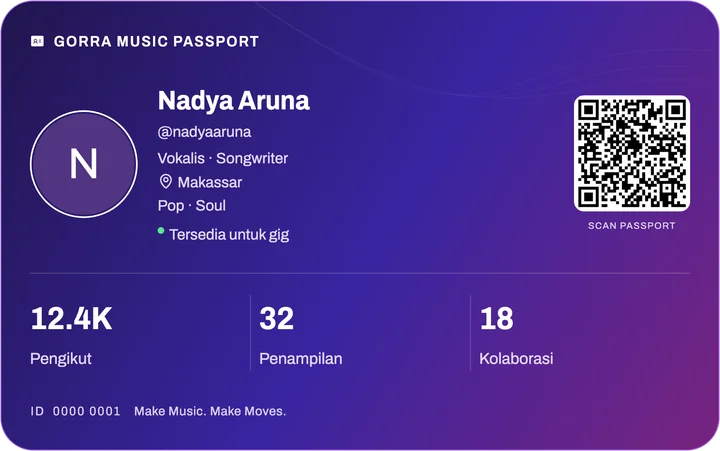
Show your portfolio when looking for collaborators or gigs. Follow the progress of your work with profile insights.
Your Music Life.
One App.
Practice. Create. Connect. Perform. Earn. Grow.
- Android Check Google Play Open Google Play in a new tab
- Web app.gorra.id · Coming soon Right in your browser, nothing to install.
- iOS Coming soon
Check Android availability for your device and region. Can’t find it? Contact us